Physical Security System With ESP32
Hardware Used
- Microcontroller
ESP32 Serves As The System’s Brain, Offering Dual-Core 240 MHz Processing, Built-In Wi-Fi/Bluetooth, and GPIO For Multiple Sensors / Tools.
- Sensors DHT11 Temperature & Humidity Sensor HC-SR501 PIR Motion Sensor MQ2 Gas/Smoke Sensor LDR Light Sensor
- Tools HW-131 Breadboard Power Module (3.3V/5V) Button KY-008 - Laser Module Buzzer RGB LED Module SG90 Servo Motor SSD1306 OLED Display
Software / Technology Used
- Programming: PlatformIO With C++ (Visual Studio Code)
- Communication Protocol: MQTT
- Backend & Automation Node-RED: Flow-Based Processing, Custom JavaScript Functions. InfluxDB3: Time-Series Storage. Grafana
- Notifications: Telegram
- User Interfaces Node-RED Dashboard Grafana Dashboard IoT MQTT Panel (Android App / Playstore)
How Was Project Done?
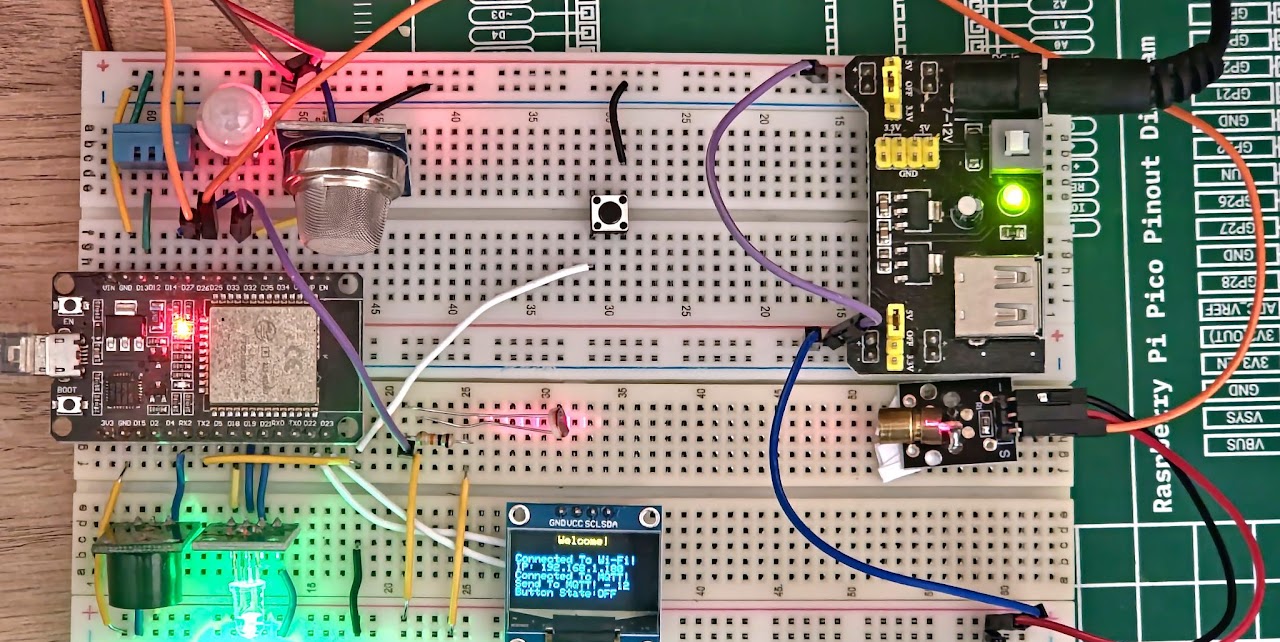
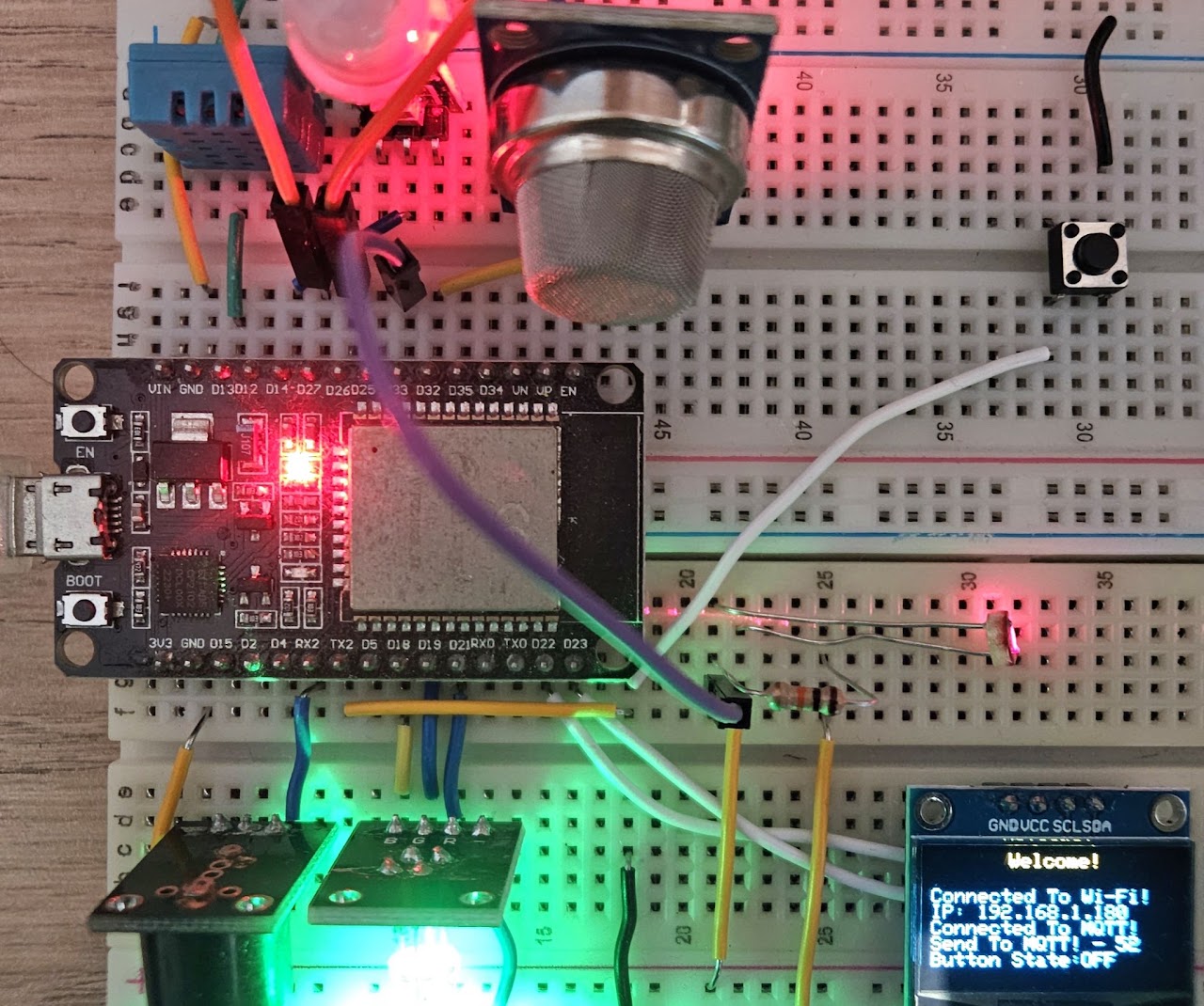
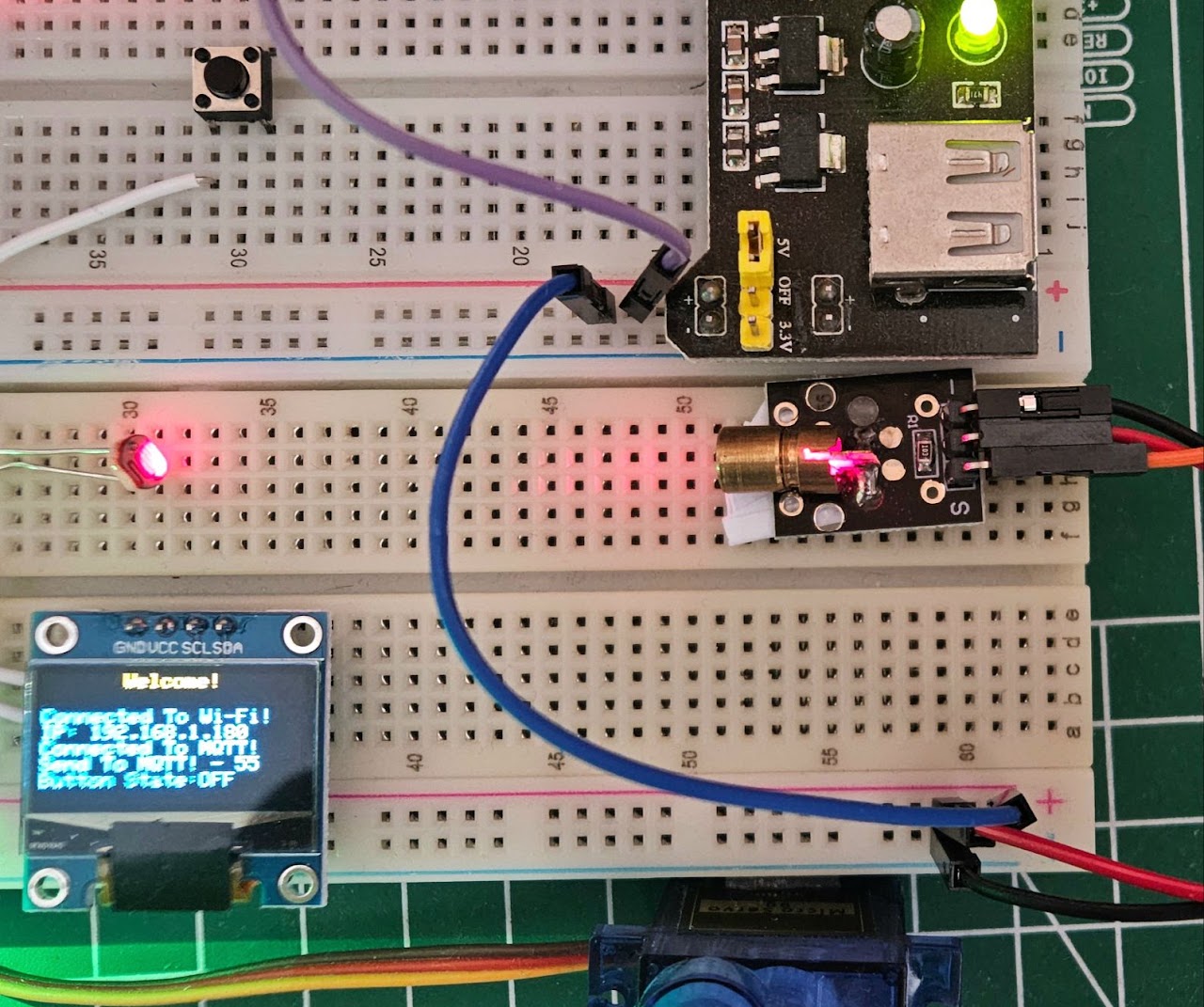
First Of All, Sensors and Tools Had To Be Connected With ESP32 On The Breadboard. Due To Some Restrictions Of ESP32, It Took Me Some Time To Determine Which Pins Would Be Used. Finally, I Got The Result In The Pictures Below.
Then I Had To Install Services Like MQTT Broker (Mosquitto), Node-RED On The Server. Since I Don’t Have A Server, I Decided To Run These Services On My Own Computer. It Is Possible To Install These Services As Docker Services On An Operating System Like Ubuntu Server. There Are Even Systems Like IOTstack That Make This Process Easier.
But I Didn’t Go That Route Because I Was Introduced To The Debian-Based Diet-Pi Operating System, Which Has Very Low System Requirements and Includes Optimized Services That Are Ready To Be Installed With A Single Command.
Since I Use Multiple Services, I Didn’t Want To Use A Single Diet-Pi Operating System. I Decided To Install Each Service On A Separate Diet-Pi Operating System and Keep The Operability High. But There Were Two Ways To Do This:
- Installing Multiple Diet-Pi Operating Systems On VMware Workstation.
- Proxmox Installation On VMware Workstation and Ability to Easily Create Multiple Diet-Pi Thanks to Proxmox’s Container Feature.
Of Course, I Chose The Second Way. I Installed Proxmox And Made Settings Such As Static IP. At This Stage, You Need To Install Diet-Pi As A Normal Operating System In Proxmox And Turn It Into A Container. Then We Can Get Clone From This Container With One Click. The Amount Of RAM Used By A Single Diet-Pi Container Is Only 20-30 MB.
I Installed My Services In These Containers I created and I Also Assigned Static IP To All Of Them.
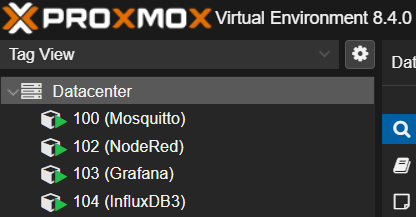
I Used Homer For Easy Access To The Web Interface Of These Services I Created (I Installed It In Mosquitto Container).

ESP32 Code
#include <WiFi.h>
#include <DHT.h>
#include <Servo.h>
#include <Wire.h>
#include <Adafruit_GFX.h>
#include <Adafruit_SSD1306.h>
#include <MQTTClient.h>
#include <ArduinoJson.h>
#define DHTPIN 13
#define DHTTYPE DHT11
DHT dht(DHTPIN, DHTTYPE);
#define MQ2PIN 32
#define PIRPIN 14
int pinStateCurrent = LOW;
int pinStatePrevious = LOW;
#define SERVOPIN 27
Servo servo;
#define LASERPIN 26
#define LDRPIN 33
#define BUZZERPIN 16
#define REDPIN 21
#define GREENPIN 19
#define BLUEPIN 18
struct Button
{
  const uint8_t PIN;
  bool pressed;
};
Button button1 = {17, false};
unsigned long button_time = 0;
unsigned long last_button_time = 0;
void IRAM_ATTR InterruptButton();
#define SCREEN_WIDTH 128 // OLED Display Width, In Pixels.
#define SCREEN_HEIGHT 64 // OLED Display Height, In Pixels.
#define OLED_RESET -1    // No Reset Pin.
#define SCREEN_ADDRESS 0x3C
Adafruit_SSD1306 display(SCREEN_WIDTH, SCREEN_HEIGHT, &Wire, OLED_RESET);
#define CLIENT_ID "ESP32-001"
const char WIFI_SSID[] = "[REDACTED]";
const char WIFI_PASSWORD[] = "[REDACTED]";
const char MQTT_BROKER_ADRRESS[] = "192.168.1.160";
const int MQTT_PORT = 1883;
const char MQTT_USERNAME[] = "Knetrix";
const char MQTT_PASSWORD[] = "[REDACTED]";
#define PUBLISH_TOPIC "ESP32-001/send"
#define SUBSCRIBE_TOPIC "ESP32-001/receive"
#define PUBLISH_INTERVAL 5000 // 5 Second.
IPAddress local_IP(192, 168, 1, 180);
IPAddress gateway(192, 168, 1, 1);
IPAddress subnet(255, 255, 255, 0);
IPAddress primaryDNS(192, 168, 1, 1);
IPAddress secondaryDNS(1, 1, 1, 1);
WiFiClient network;
MQTTClient mqtt = MQTTClient(256);
unsigned long lastPublishTime = 0;
void connectToMQTT();
void sendToMQTT();
int mqttMessage = 0;
void messageHandler(String &topic, String &payload);
void setup()
{
  Wire.begin(23, 22);
  // Initialize OLED Object.
  if (!display.begin(SSD1306_SWITCHCAPVCC, SCREEN_ADDRESS))
  {
    Serial.println(F("SSD1306 Allocation Failed"));
    for (;;)
      ;
  }
  display.clearDisplay();
  display.setTextSize(1);
  display.setTextColor(WHITE);
  WiFi.config(local_IP, gateway, subnet, primaryDNS, secondaryDNS);
  WiFi.begin(WIFI_SSID, WIFI_PASSWORD);
  display.setCursor(0, 16);
  display.print("Connecting To Wifi");
  display.display();
  while (WiFi.status() != WL_CONNECTED)
  {
    delay(1000);
    display.print(".");
    display.display();
  }
  display.fillRect(0, 16, 128, 8, BLACK);
  display.display();
  display.setCursor(40, 0);
  display.println("Welcome!");
  display.setCursor(0, 16);
  display.println("Connected To Wi-Fi!");
  display.setCursor(0, 24);
  display.print("IP: ");
  display.print(WiFi.localIP());
  display.display();
  connectToMQTT();
  mqtt.publish("ESP32-001/status", "boot");
  Serial.begin(115200);
  dht.begin();
  pinMode(PIRPIN, INPUT);
  servo.attach(SERVOPIN);
  pinMode(LASERPIN, OUTPUT);
  pinMode(BUZZERPIN, OUTPUT);
  pinMode(REDPIN, OUTPUT);
  pinMode(GREENPIN, OUTPUT);
  pinMode(BLUEPIN, OUTPUT);
  pinMode(button1.PIN, INPUT_PULLUP);
  attachInterrupt(button1.PIN, InterruptButton, FALLING);
  // Initial State (Alarm Off)
  analogWrite(REDPIN, 0);
  analogWrite(GREENPIN, 255);
  analogWrite(BLUEPIN, 0);
  // Initial State (Door Off)
  servo.write(0); // Door Close.
  // Initial State (Lazer On)
  digitalWrite(LASERPIN, HIGH);
}
void loop()
{
  mqtt.loop();
  if (!mqtt.connected())
  {
    display.fillRect(0, 32, 128, 8, BLACK);
    display.fillRect(0, 40, 128, 8, BLACK);
    display.fillRect(0, 48, 128, 8, BLACK);
    connectToMQTT();
  }
  else if (millis() - lastPublishTime > PUBLISH_INTERVAL)
  {
    sendToMQTT();
    lastPublishTime = millis();
  }
}
void IRAM_ATTR InterruptButton()
{
  button_time = millis();
  if (button_time - last_button_time > 250)
  {
    ets_printf("ISR Triggered.\n");
    button1.pressed = !button1.pressed;
    last_button_time = button_time;
  }
}
void connectToMQTT()
{
  mqtt.begin(MQTT_BROKER_ADRRESS, MQTT_PORT, network);
  mqtt.onMessage(messageHandler);
  display.setCursor(0, 32);
  display.print("Connecting To MQTT");
  display.display();
  while (!mqtt.connect(CLIENT_ID, MQTT_USERNAME, MQTT_PASSWORD))
  {
    delay(1000);
    display.print(".");
    display.display();
  }
  mqtt.subscribe(SUBSCRIBE_TOPIC);
  display.fillRect(0, 32, 128, 8, BLACK);
  display.setCursor(0, 32);
  display.print("Connected To MQTT!");
  display.display();
}
void sendToMQTT()
{
  mqttMessage++;
  float h = dht.readHumidity();
  float t = dht.readTemperature();
  int mq2Value = map(analogRead(MQ2PIN), 0, 4096, 0, 100);
  int pirValue = digitalRead(PIRPIN);
  int ldrValue = analogRead(LDRPIN);
  bool buttonPressed = button1.pressed;
  JsonDocument message;
  message["temperature"] = isnan(t) ? -999 : t;
  message["humidity"] = isnan(h) ? -999 : h;
  message["smoke"] = mq2Value;
  message["pir"] = pirValue;
  message["ldr"] = ldrValue;
  message["button"] = buttonPressed;
  char messageBuffer[512];
  serializeJson(message, messageBuffer);
  mqtt.publish(PUBLISH_TOPIC, messageBuffer);
  Serial.println("Sent To MQTT:");
  Serial.print("- Topic: ");
  Serial.println(PUBLISH_TOPIC);
  Serial.print("- Payload:");
  Serial.println(messageBuffer);
  Serial.println();
  display.setCursor(0, 40);
  display.print("Send To MQTT! - " + String(mqttMessage));
  display.setCursor(0, 48);
  display.print("Button State:");
  if (buttonPressed)
    display.print("ON");
  else
    display.print("OFF");
  display.display();
  display.fillRect(0, 40, 128, 8, BLACK);
  display.fillRect(0, 48, 128, 8, BLACK);
}
void beep(int delayms);
bool elseTriggered = false;
void messageHandler(String &topic, String &payload)
{
  // Serial.println("Received From MQTT:");
  // Serial.println("- Topic: " + topic);
  // Serial.print("- Payload: ");
  // Serial.println(payload);
  // You Can Process The Incoming Data As Json Object, Then Control Something.
  JsonDocument doc;
  deserializeJson(doc, payload);
  bool ldrAlarmState = doc["ldrAlarmState"].as<bool>();
  bool sensorAlarmState = doc["sensorAlarmState"].as<bool>();
  bool doorState = doc["doorState"].as<bool>();
  if (ldrAlarmState || sensorAlarmState)
  {
    analogWrite(REDPIN, 255);
    analogWrite(GREENPIN, 0);
    analogWrite(BLUEPIN, 0);
    beep(500);
    elseTriggered = false;
  }
  else
  {
    if (!elseTriggered)
    {
      analogWrite(REDPIN, 0);
      analogWrite(GREENPIN, 255);
      analogWrite(BLUEPIN, 0);
      elseTriggered = true;
    }
  }
  if (doorState)
  {
    digitalWrite(LASERPIN, LOW);
    servo.write(180);
  }
  else
  {
    servo.write(0);
    digitalWrite(LASERPIN, HIGH);
  }
}
void beep(int delayms)
{
  digitalWrite(BUZZERPIN, HIGH);
  delay(delayms);
  digitalWrite(BUZZERPIN, LOW);
  delay(delayms);
}
Node-RED Flow
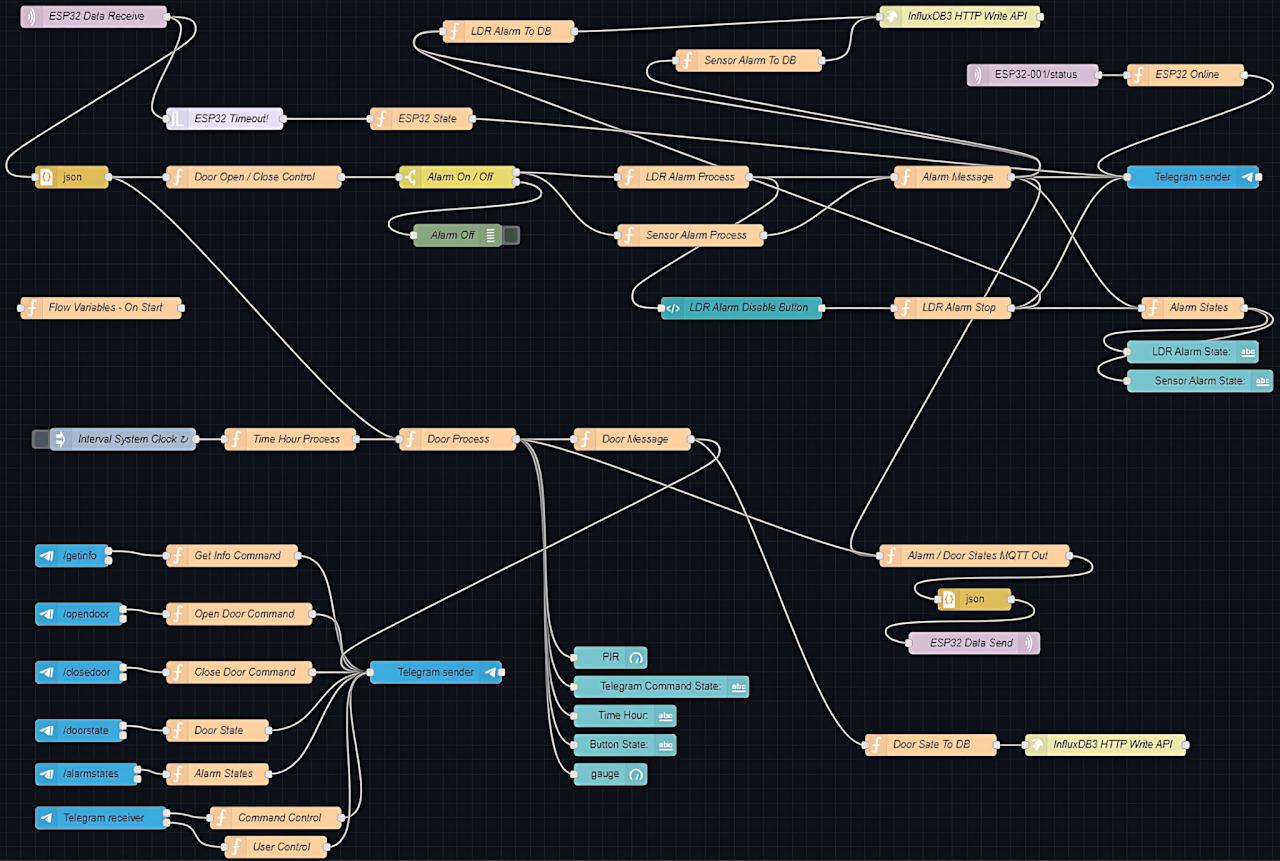
Node-RED Dashboard
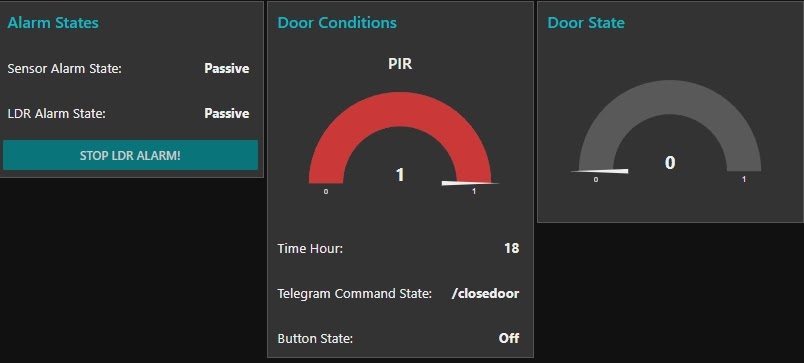
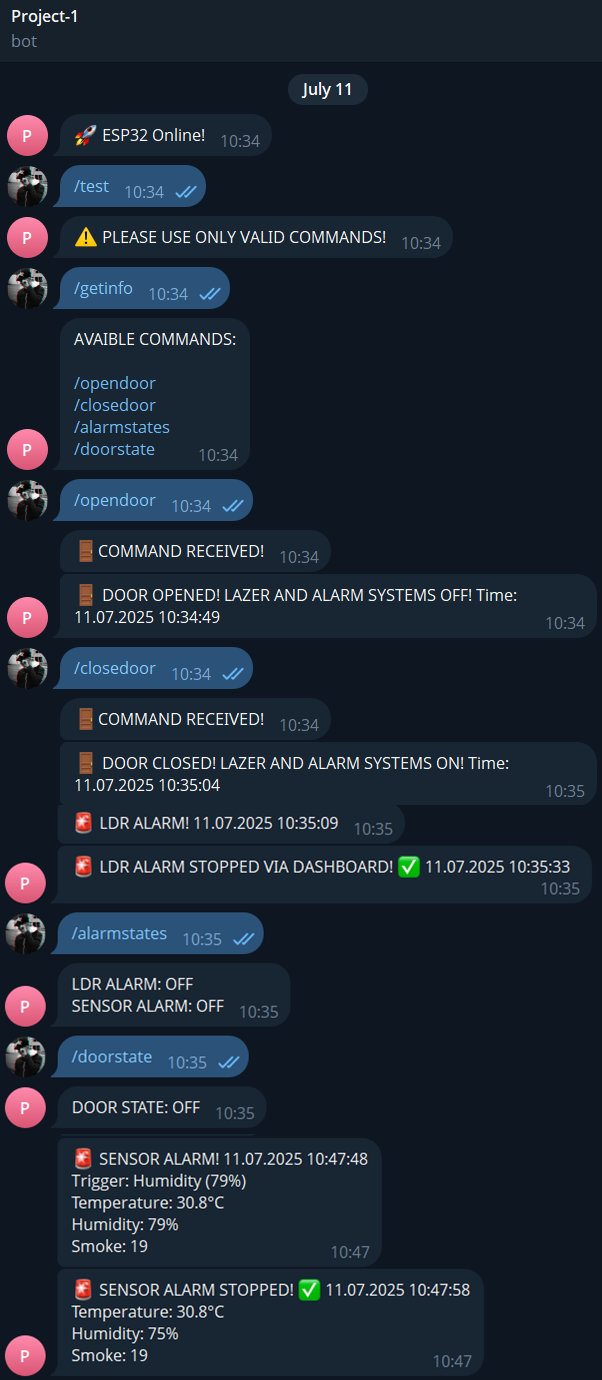
Telegram
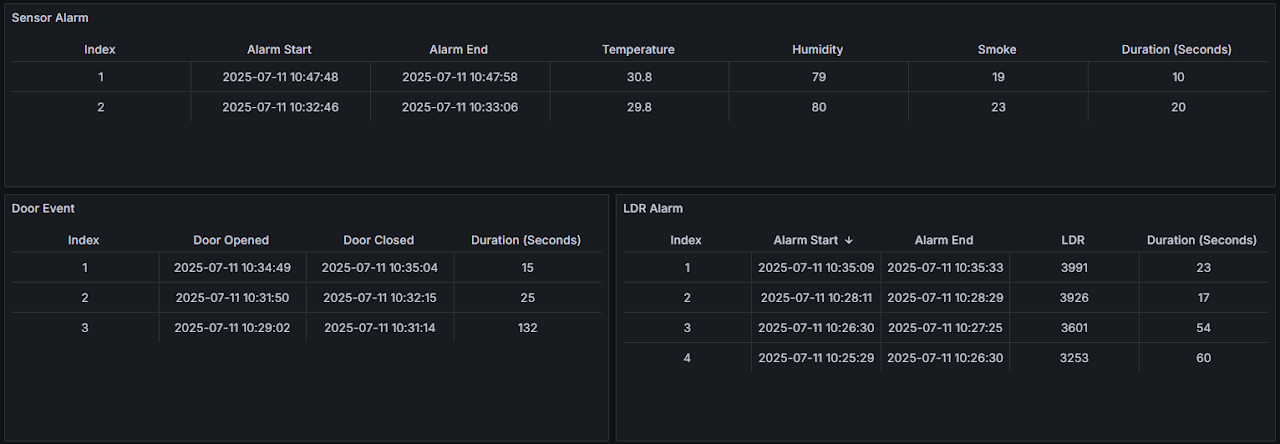
Grafana
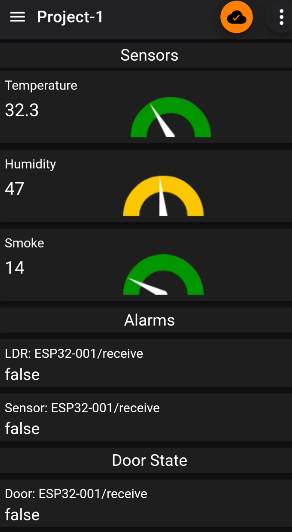
IoT MQTT Panel