Secure Data Collection and Access With ESP8266
Hardware Used
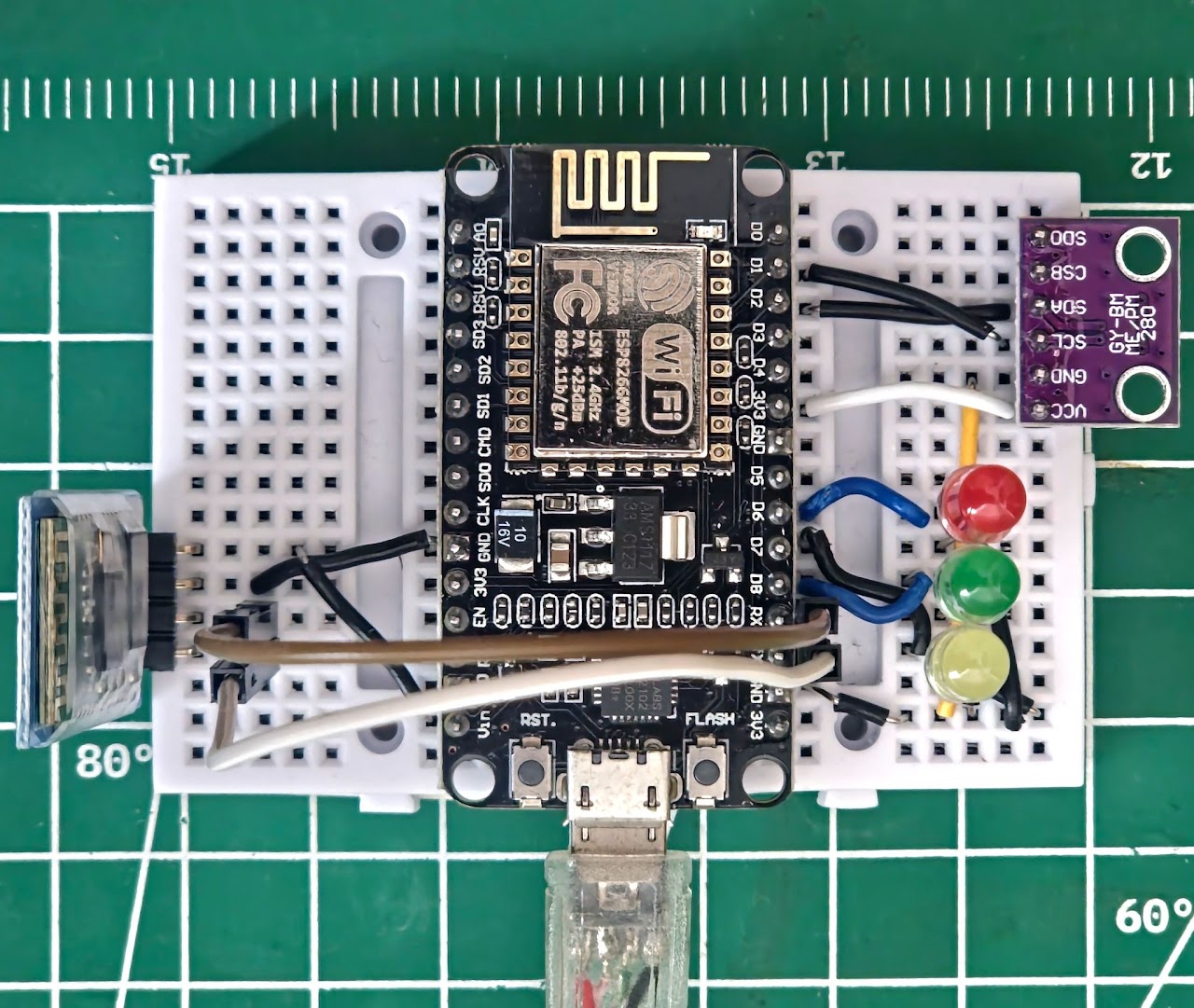
- ESP8266
- BME280: Temperature Humidity and Pressure Sensor
- LEDs (Red, Yellow, Green)
- HC06 (Bluetooth Module)
Software / Technology Used
- Programming: PlatformIO With C++ (Visual Studio Code)
- Communication Protocol: MQTT
- Backend & Automation Node-RED: Flow-Based Processing, Custom JavaScript Functions. InfluxDB3: Time-Series Storage.
- User Interfaces Node-RED Dashboard Mobile Dashboard (Bluetooth Terminal)
Summary
Data Collected With ESP8266 is Encrypted and Transferred To The Database And Solving Data Only With A Python Program In USB. Program is Independent (Portable).
How Was Project Done?
Sensor and Tools Were Connected To ESP8266 On Breadboard.
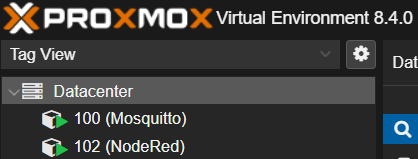
Then I Had To Install Services Like MQTT Broker (Mosquitto), Node-RED On The Server. Since I Don’t Have A Server, I Decided To Run These Services On My Own Computer. It Is Possible To Install These Services As Docker Services On An Operating System Like Ubuntu Server. There Are Even Systems Like IOTstack That Make This Process Easier.
But I Didn’t Go That Route Because I Was Introduced To The Debian-Based Diet-Pi Operating System, Which Has Very Low System Requirements and Includes Optimized Services That Are Ready To Be Installed With A Single Command.
Since I Use Multiple Services, I Didn’t Want To Use A Single Diet-Pi Operating System. I Decided To Install Each Service On A Separate Diet-Pi Operating System and Keep The Operability High. But There Were Two Ways To Do This:
- Installing Multiple Diet-Pi Operating Systems On VMware Workstation.
- Proxmox Installation On VMware Workstation and Ability to Easily Create Multiple Diet-Pi Thanks to Proxmox’s Container Feature.
Of Course, I Chose The Second Way. I Installed Proxmox And Made Settings Such As Static IP. At This Stage, You Need To Install Diet-Pi As A Normal Operating System In Proxmox And Turn It Into A Container. Then We Can Get Clone From This Container With One Click. The Amount Of RAM Used By A Single Diet-Pi Container Is Only 20-30 MB.
I Installed My Services In These Containers I created and I Also Assigned Static IP To All Of Them.
I Used Homer For Easy Access To The Web Interface Of These Services I Created (I Installed It In Mosquitto Container).

ESP8266 Code
#include <Arduino.h>
#include <ESP8266WiFi.h>
#include <MQTTClient.h>
#include <ArduinoJson.h>
#include <Adafruit_BME280.h>
Adafruit_BME280 bme; // Default I2C and SPI.
#define LEDRED D6
#define LEDGREEN D8
#define LEDYELLOW D7
String receivedBtData = "";
int ledState[3] = {0, 0, 0};
void handleSerialCommand(String command);
#define CLIENT_ID "ESP8266-001"
const char WIFI_SSID[] = "[REDACTED]";
const char WIFI_PASSWORD[] = "[REDACTED]";
const char MQTT_BROKER_ADRRESS[] = "192.168.1.160";
const int MQTT_PORT = 1883;
const char MQTT_USERNAME[] = "Knetrix";
const char MQTT_PASSWORD[] = "[REDACTED]";
#define PUBLISH_TOPIC "ESP8266-001/send"
// #define SUBSCRIBE_TOPIC "ESP8266-001/receive"
#define PUBLISH_INTERVAL 5000 // 5 Second.
IPAddress local_IP(192, 168, 1, 180);
IPAddress gateway(192, 168, 1, 1);
IPAddress subnet(255, 255, 255, 0);
IPAddress primaryDNS(192, 168, 1, 1);
IPAddress secondaryDNS(1, 1, 1, 1);
WiFiClient network;
MQTTClient mqtt = MQTTClient(256);
unsigned long lastPublishTime = 0;
void connectToMQTT();
void sendToMQTT();
// void messageHandler(String &topic, String &payload);
void setup()
{
  Serial.begin(9600);
  bme.begin(0x76);
  pinMode(LEDRED, OUTPUT);
  pinMode(LEDGREEN, OUTPUT);
  pinMode(LEDYELLOW, OUTPUT);
  WiFi.config(local_IP, gateway, subnet, primaryDNS, secondaryDNS);
  WiFi.begin(WIFI_SSID, WIFI_PASSWORD);
  while (WiFi.status() != WL_CONNECTED)
    delay(1000);
  connectToMQTT();
}
void loop()
{
  mqtt.loop();
  if (!mqtt.connected())
    connectToMQTT();
  else if (millis() - lastPublishTime > PUBLISH_INTERVAL)
  {
    sendToMQTT();
    lastPublishTime = millis();
  }
  if (Serial.available() > 0)
  {
    receivedBtData = Serial.readString();
    handleSerialCommand(receivedBtData);
  }
}
void connectToMQTT()
{
  mqtt.begin(MQTT_BROKER_ADRRESS, MQTT_PORT, network);
  // mqtt.onMessage(messageHandler);
  while (!mqtt.connect(CLIENT_ID, MQTT_USERNAME, MQTT_PASSWORD))
    delay(1000);
  // mqtt.subscribe(SUBSCRIBE_TOPIC);
}
void sendToMQTT()
{
  float h = bme.readHumidity();
  float t = bme.readTemperature();
  float p = bme.readPressure() / 100.0F;
  JsonDocument message;
  message["temperature"] = isnan(t) ? -999 : t;
  message["humidity"] = isnan(h) ? -999 : h;
  message["pressure"] = isnan(p) ? -999 : p;
  // message["ledState"] = String(ledState[0]) + ", " + String(ledState[1]) + ", " + String(ledState[2]);
  JsonArray ledStateArray = message.createNestedArray("ledState");
  for (int i = 0; i < 3; i++)
    ledStateArray.add(ledState[i]);
  char messageBuffer[512];
  serializeJson(message, messageBuffer);
  mqtt.publish(PUBLISH_TOPIC, messageBuffer);
}
void handleSerialCommand(String command)
{
  command.trim();
  command.toLowerCase();
  if (command == "red_on")
  {
    digitalWrite(LEDRED, HIGH);
    Serial.println("Opened Red LED.");
    ledState[0] = 1;
  }
  else if (command == "red_off")
  {
    digitalWrite(LEDRED, LOW);
    Serial.println("Closed Red LED.");
    ledState[0] = 0;
  }
  else if (command == "green_on")
  {
    digitalWrite(LEDGREEN, HIGH);
    Serial.println("Opened Green LED.");
    ledState[1] = 1;
  }
  else if (command == "green_off")
  {
    digitalWrite(LEDGREEN, LOW);
    Serial.println("Closed Green LED.");
    ledState[1] = 0;
  }
  else if (command == "yellow_on")
  {
    digitalWrite(LEDYELLOW, HIGH);
    Serial.println("Opened Yellow LED.");
    ledState[2] = 1;
  }
  else if (command == "yellow_off")
  {
    digitalWrite(LEDYELLOW, LOW);
    Serial.println("Closed Yellow LED.");
    ledState[2] = 0;
  }
  else
    Serial.println("Wrong Command.");
}
Node-RED Flow
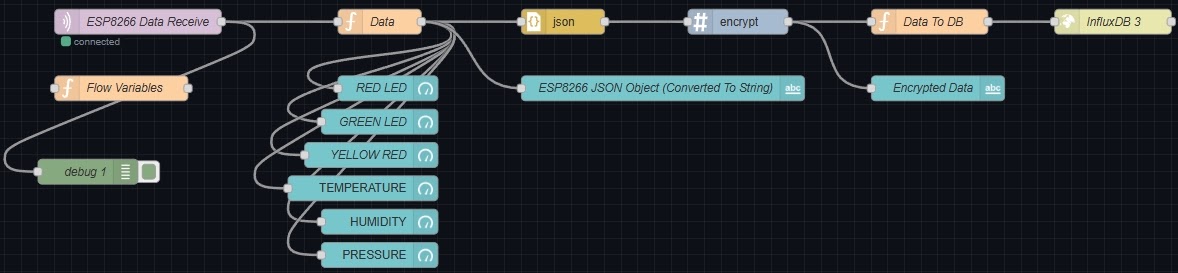
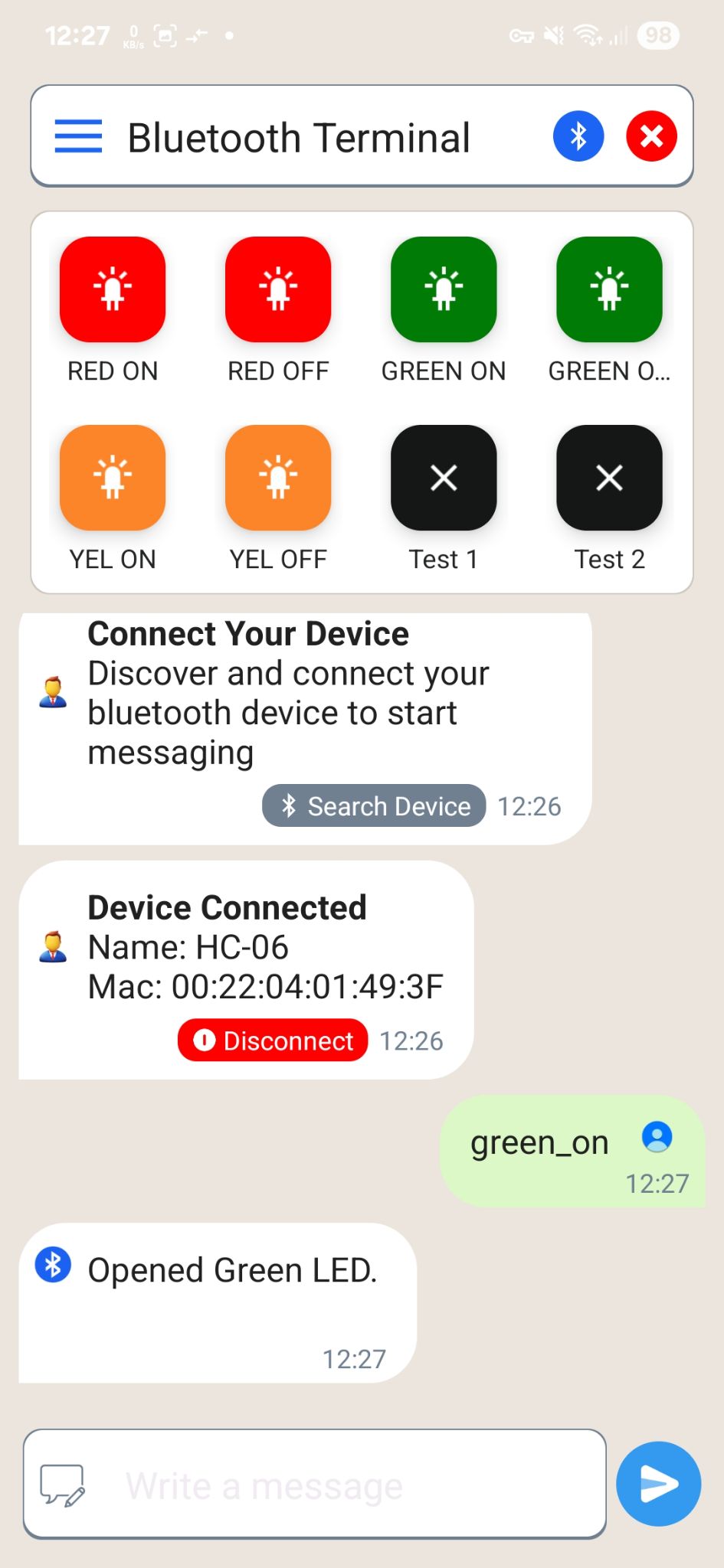
Mobile Dashboard
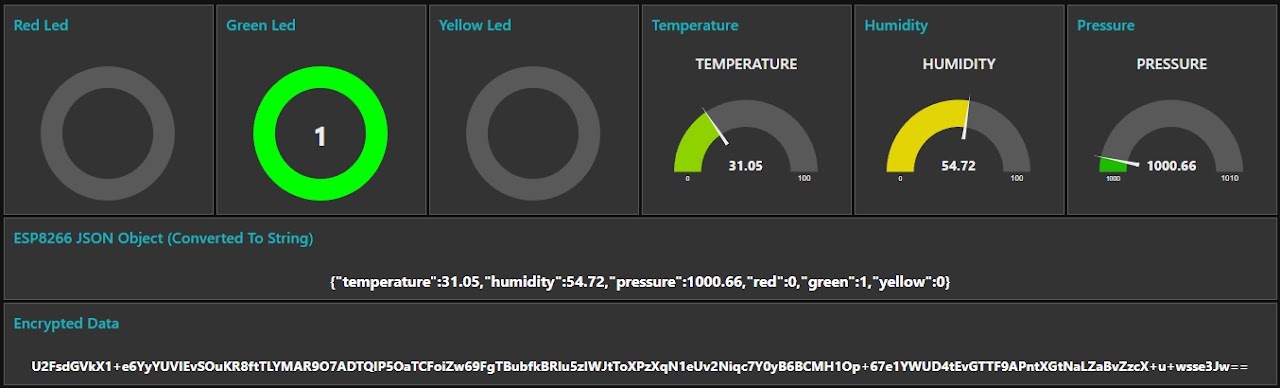
Node-RED Dashboard
Python
-
Libraries cryptojsaesdecrypt python-dotenv pandas influxdb3-python
-
Code
from aesdecrypt import decryptCipher
from influxdb_client_3 import InfluxDBClient3
import pandas as pd
from dotenv import load_dotenv
import datetime as dt  # Date Settings.
import os
import sys
import json
load_dotenv()  # .env File.
listEncryptedData = []
listDecryptedData = []
listTimestamps = []
listTimestampsString = []
client = InfluxDBClient3(
    token=os.environ.get("token"),
    host='http://192.168.1.163:8181',
    database='Project-2'
)
table = client.query(
    query='SELECT * FROM "Encrypted" ORDER BY "time" DESC',
    language='sql'
)
dfData = table.to_pandas()
def getEncryptedData():
    try:
        print("Retrieving Encrypted Data From Database...", end=" ")
        for i in dfData['data']:
            listEncryptedData.append(i)
        print("Done!")
        print("Converting Encrypted Data Into CSV File...", end=" ")
        dfCsv = pd.DataFrame(listEncryptedData, columns=["Data"])
        dfCsv.to_csv(".\\Files\\App\\encryptedData.csv", index=False)
        print("Done!")
        dfCsv = pd.read_csv(".\\Files\\App\\encryptedData.csv")
        line_number = len(dfCsv)
        print(f"{line_number} Data Records Found!")
    except Exception as e:
        print(f"Error: {e}")
        exit_program()
def decryptedData():
    try:
        print("Decrypting Encrypted Data...", end=" ")
        crytojs_passphrase = os.environ.get("crytojs_passphrase").encode()
        for record in listEncryptedData:
            dec_str = decryptCipher(record, crytojs_passphrase)
            dec_json = json.loads(dec_str)
            listDecryptedData.append(dec_json)
        print("Done!")
    except Exception as e:
        print(f"Error: {e}")
        exit_program()
def dataTimestamps():
    try:
        print("Getting Data Timestamps...", end=" ")
        for i in dfData['time']:
            listTimestamps.append(i)
        gmt3 = dt.timedelta(hours=3)
        for time in listTimestamps:
            time += gmt3
            listTimestampsString.append(time.strftime("%Y-%m-%d %H:%M:%S"))
        print("Done!")
    except Exception as e:
        print(f"Error: {e}")
        exit_program()
def result():
    try:
        print("Converting Decrypted Data Into CSV File...", end=" ")
        processed_data = []
        for i, json_data in enumerate(listDecryptedData):
            row = {
                'Date': listTimestampsString[i],
                'temperature': json_data.get('temperature', 0),
                'humidity': json_data.get('humidity', 0),
                'pressure': json_data.get('pressure', 0),
                'red': json_data.get('red', 0),
                'green': json_data.get('green', 0),
                'yellow': json_data.get('yellow', 0)
            }
            processed_data.append(row)
        dfCsv = pd.DataFrame(processed_data)
        dfCsv.to_csv(".\\Files\\App\\decryptedData.csv", index=False)
        print("Done!")
    except Exception as e:
        print(f"Error: {e}")
        exit_program()
def exit_program():
    print("Exiting The Program...")
    sys.exit()
print("Welcome.")
getEncryptedData()
decryptedData()
dataTimestamps()
result()
print("All Done! See You Later...")
- .env File
crytojs_passphrase = “[REDACTED]”
token = “[REDACTED]”
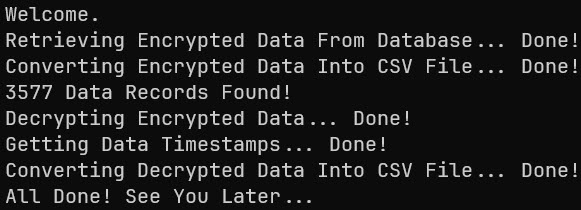
- Example Python Program Output
- Example Encrypted CSV File (Data Retrieved From Database)

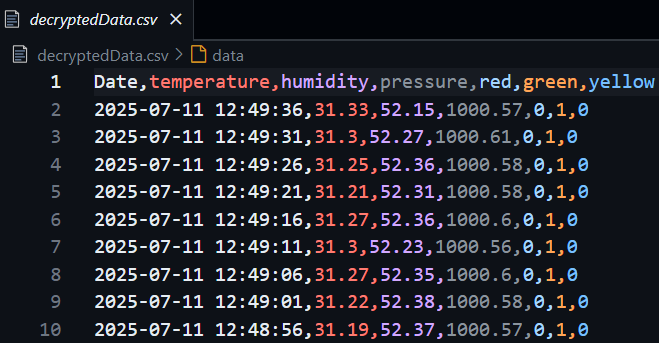
- Example Decrypted CSV File